
Sales reps texting customers from personal WhatsApp? Move the chats to the company number
You want everyone on the team to answer customers quickly on WhatsApp, but they all write from their personal phones? That is convenient – until someone is ill, on holiday or leaves. Then nobody knows what was promised, the customer waits, and their number walks out of the door. Whoever leads the team cannot see who replies to whom, or how fast. The-Y CRM is the answer: one company number for everyone, one shared inbox, and when someone leaves, the chats stay with the company. Below is the switch in five steps, with a message template for customers and a team rule to adapt.
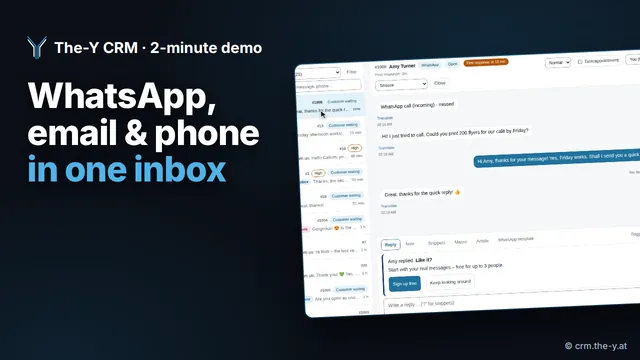 Watch the 2-minute demo (YouTube)WhatsApp, email, phone & web chat in one inbox · 2:19 min · opens YouTube in a new tab
Several personal numbers cannot be merged into one, and old chats on personal phones do not move into any system. The way forward: pick one company number, connect it to a team inbox, give every customer a responsible person, tell customers once about the new number and agree a short team rule. When someone leaves, the chats stay in the inbox. The number can be new or already running – in the WhatsApp Business app or on Meta's Cloud API – and a landline works too.
What goes wrong with personal numbers
| Problem | What happens day to day |
|---|---|
| The customer leaves with the rep | When someone leaves the company, chat history and number stay on their phone. The customer keeps writing there. |
| No cover | On holiday or sick leave nobody reads along. Offers and promises are invisible to colleagues. |
| No overview | Whoever leads the team cannot see which request is open and how long a customer has been waiting. |
| Data protection | The WhatsApp app syncs the phone's address book – private and business mixed. Only sync contacts you have a legal basis for, and clarify how you handle this with your data protection adviser; this is not legal advice. |
The plan in 5 steps
1. Pick one company number
Either a new number – mobile or landline – or a number you already use: in the WhatsApp Business app or on Meta's Cloud API. What matters: it belongs to the company, not to a person. A landline works too: WhatsApp Business with a landline.
2. Connect it to a team inbox and invite the team
In The-Y CRM: Settings → Channels → WhatsApp → “Connect WhatsApp”, in Meta's window, in about 5–10 minutes. If the number already runs in the Business app, it can stay there (up to 180 days of history are imported); if it already runs on the Cloud API, it stays registered there. Then invite people under Settings → Team & permissions: role Agent for sales, Team lead for you. With the scope “own only”, a person sees only their own customers among the contacts.
3. Give every customer a responsible person
Existing customers keep “their” contact person: the contact record shows who is responsible. Whoever takes over or answers a conversation becomes responsible automatically if nobody is set yet. New requests can be distributed in turn to everyone who is available, or by workload. The conversation header shows who is looking at it right now, so two people do not answer at the same time.
4. Tell customers once about the new number
Each person sends their customers one short message from the old phone. After that the company number goes everywhere: signature, business card, website, Google profile, offers.
Hi [first name], from now on you can reach me and my team on our company number [number] – on WhatsApp too. That way someone always replies, even when I'm away. Please save the number. Thanks, and speak soon!
5. Agree a team rule
Without a rule, customers end up back in personal chats within three weeks. Adapt this template and share it with the team:
- We only write to customers from the company number. We no longer give out personal numbers.
- Every request has a responsible person. Whoever takes a conversation clicks “Take over”.
- The first reply comes within an agreed time during opening hours.
- On holiday or sick leave, the team lead takes over. We reassign open conversations beforehand.
- Internal agreements go into an internal note in the conversation – not into a private chat.
- We only message customers on WhatsApp who have agreed – marketing only with explicit consent.
- If a customer still writes privately, we reply briefly with the company number.
- Customer conversations belong to the company. If someone leaves the team, they stay in the inbox.
Template to adapt, not legal or employment-law advice. If you have a works council, agree the rule with it.
What the team lead sees afterwards
- Reports per person: how many conversations someone received and how many messages they sent, and how fast the first reply came on average.
- Response times with a warning: if a conversation gets no first reply within the set time, team leads and admins get a notice.
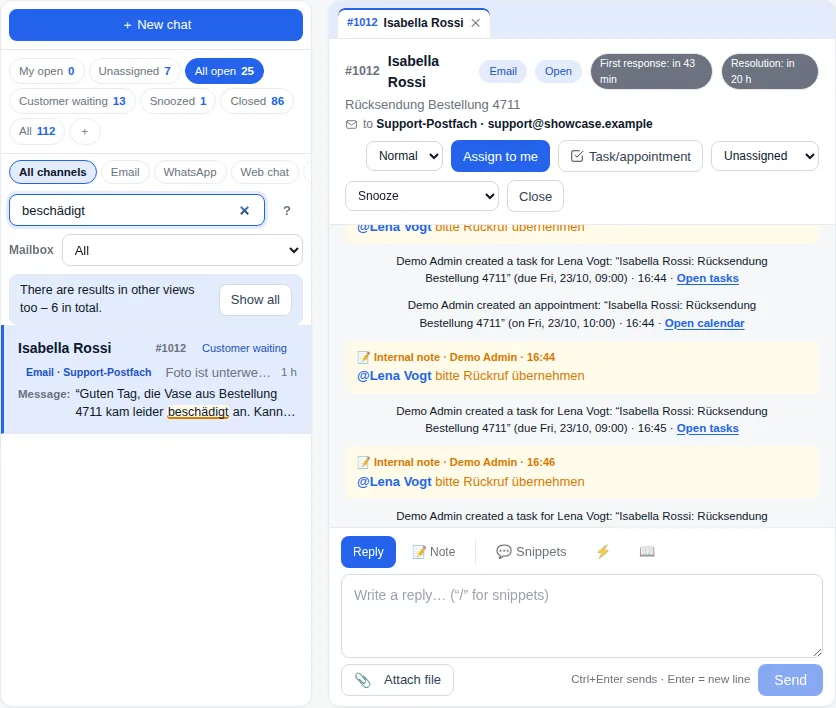
- Views for open work: conversations where the customer is waiting and conversations without an owner – nothing falls through.
- History per customer: WhatsApp, email and calls in one timeline, plus deals with value and stage in the pipeline.
When someone leaves the team
- Conversations live in the CRM, not on the phone. The phone app only stores program files, never customer data.
- An admin deactivates access under Settings → Team & permissions and reassigns open conversations.
- If the person let their phone ring along for company calls, an admin removes the stored mobile number.
- What was written privately before stays on the personal phone – which is why switching early pays off.
What it costs
- The-Y CRM: Free €0 for up to 3 people. Cloud Pro €20/month per company, all users and brands (during Alpha and Beta; €40 from the Live release), servers in Austria (data centre in Vienna). No price per head – a bigger sales team costs the same.
- Meta: per WhatsApp number, the first 1,000 free-form replies each month are free. After that Meta charges per message, and the price depends on the country. Meta bills you directly, with no mark-up from us. Examples per country: cost page.
- Rather not set it up alone? We set it up with you for free: done-for-you setup.
When another route fits better
The Business app is enough if …
- you are two or three people who coordinate well – then you share one number on up to five devices (how it works),
- nobody needs to hand over or cover conversations.
Also look at other tools if …
- your sales team mainly needs a large sales pipeline with many integrations – Kommo, HubSpot and Pipedrive are long established for that (Kommo comparison, HubSpot comparison),
- you need mature software today – The-Y CRM is in Alpha.
Frequently asked questions
How do we get our sales reps' WhatsApp chats into one inbox?
Several personal numbers cannot be merged, and old chats from personal phones cannot be imported. You pick one company number, connect it to a team inbox and tell customers once about the new number. From then on all new conversations run there.
Can every rep keep their own customers?
Yes. The contact shows who is responsible, and with the scope “own only” a person sees only their own customers among the contacts. During holidays the team lead reassigns the conversations.
Can the team lead see who replies how fast?
Yes. In The-Y CRM the reports show per person how many conversations they received, how many messages they sent and how fast the first reply came on average. If a conversation stays unanswered for too long, the team lead gets a notice.
What happens to customer conversations when someone quits?
In the team inbox they stay with the company. An admin deactivates the account and reassigns open conversations. Chats that ran on the personal phone before stay there.
Is WhatsApp on a personal phone allowed for customer contact?
It depends on how you use it; there is no blanket yes or no. A common criticism is that the app syncs the phone's address book. Use a separate company phone without private contacts and only sync contacts you have a legal basis for. Clarify this with your data protection adviser – this is not legal advice.
See it for yourself.
The demo shows the inbox, phone system and deals with sample data, no sign-up. Everything is deleted after 24 hours.
Prefer to do it together? We set it up with you by video call – in your browser, nothing to install. Mon–Fri 10–12 and 14–17 (Vienna time).
WhatsApp Business with a landline · WhatsApp Business with multiple users · WhatsApp Business and personal on one phone · Done-for-you setup · Kommo alternative · All comparisons
Sources
- The-Y CRM: Connect WhatsApp · Team & roles (roles, scope) · Docs (assigning, responsible person, distributing conversations, team lead warnings) · Meta center · App on your phone (no customer data on the device)
- Prices: cost page (Meta's price list per country)
WhatsApp is a trademark of WhatsApp LLC / Meta; Kommo, HubSpot and Pipedrive are trademarks of their owners. Information to the best of our knowledge; please report mistakes to office@the-y.at and we will correct them right away.