
Free live chat for your website: add it in minutes, answer as a team
Many customers would rather ask a quick question than fill in a form – and form emails often end up in a mailbox nobody watches. A live chat is a small chat bubble at the bottom right of your website. The visitor writes, you reply – in the same inbox as WhatsApp, email and calls. Here is how to add the chat to WordPress, Wix, Shopify or Squarespace, what to decide first, and where the limits are – using The-Y CRM as the example.
Before you start: three questions
- Who replies? Decide who keeps an eye on the chat. In the inbox you assign conversations to a person and write internal notes the visitor never sees.
- When are you there? Enter your opening hours and holidays once. They apply to all channels; the web chat can also get its own hours.
- What happens outside those hours? Write one text for inside (“We’ll be right with you”) and one for outside (“We’ll get back to you tomorrow morning”). The automatic reply goes to a visitor’s first message. On holidays, the “outside” text goes out.
Add the chat in about 2 minutes
- Create a free account on crm.the-y.at.
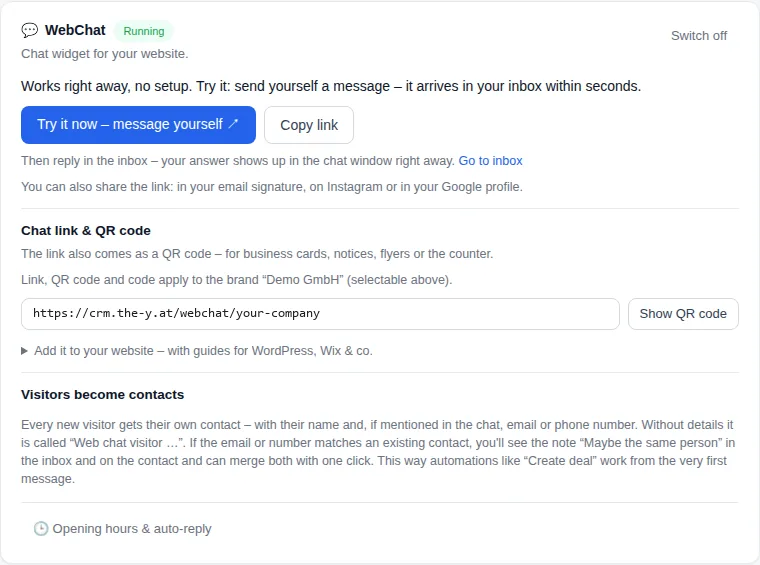
- Open the “WebChat” card under Settings → Channels. The chat runs right away, no setup needed.
- Click “Try it now – message yourself”: your message lands in the inbox within seconds, and your reply shows up in the chat window.
- Copy the embed code. It is one line:
<script src="https://crm.the-y.at/webchat/<your-company>/widget.js" async></script>Your account’s address is already filled in. - Paste the code right before
</body>on every page where the chat should appear. For the whole website, put it in the shared footer template. - Reload your website – the chat bubble appears at the bottom right.
Step by step for your website builder
| Website builder | Steps | Good to know |
|---|---|---|
| WordPress |
| On WordPress.com this only works with a plan that allows plugins. |
| Wix |
| Wix only allows custom code with a Premium plan and a connected domain. |
| Shopify |
| First make a copy of the theme via “…” → “Duplicate” – then you can always go back. |
| Squarespace |
| Squarespace only offers Code Injection on paid plans. |
| Jimdo |
| Depending on your Jimdo package, custom code may need a paid plan. |
| Other system |
| No code at all: add a “Chat” button or link that points to your chat link. |
The same steps appear in the CRM’s WebChat card. No guarantee: website builders change their menus from time to time. If you can’t find an option, your web designer or the builder’s support can help.
Chat link and QR code – no code at all
The chat also has its own link. Put it in your email signature, your Google profile or your Instagram bio. On your website, a “Chat” button that points to this link is enough. For business cards, notices, flyers or the counter, save the QR code as an image. Anyone who scans it with a phone camera lands straight in the chat. The QR code is created in your browser.
What else the chat can do
For your visitors
- Your look: the bubble takes your brand’s accent colour and name. With several brands (Cloud Pro), each brand has its own code – handy if you run several websites.
- Chatbot by keywords: if someone asks about “opening hours”, your ready-made answer goes out.
- AI answers (optional): with your own AI key, a bot answers questions from your knowledge base. When it is unsure, it hands the conversation to a person.
For your team
- One inbox: chats sit next to WhatsApp, email, Instagram, Messenger and calls.
- Visitors become contacts – with name, email or phone number if they mention them in the chat.
- No wrong matches: if an address matches an existing contact, you see “Maybe the same person as …”. Contacts are only merged when you click.
- Flows: a deal can be created from the very first message, for example.
Free live chat tools compared
| Tool | Free plan | Paid | Good to know |
|---|---|---|---|
| tawk.to | free; “Powered by tawk.to” stays | remove branding: $29/month; AI Assist from $29/month | a dedicated chat tool |
| Tidio | Free plan, $0/month | Starter from $24.17/month; Lyro AI Agent from $32.50/month | the first 50 Lyro AI conversations are free (once) |
| Crisp | free forever: 2 seats, website chat widget, shared inbox, 100 customer profiles, no AI credits | Mini $45/month per workspace (4 seats) | paid plans are priced per workspace |
| LiveChat | none; 14-day trial | Essential $19 per user/month, billed annually | priced per seat; Growth $79 per user/month |
| HubSpot | free for up to 2 users, live chat with HubSpot branding | Service Hub Starter: $7 or $20 per seat/month as shown (discounts for new customers only) | part of a large CRM platform |
| The-Y CRM | Free: €0 forever, up to 3 users, “Powered by The-Y” in the chat; replies count toward 1,000 outgoing messages a month | Cloud Pro €20/month per company, all users and brands included | chat in the same inbox as WhatsApp, email and calls |
Vendor details as shown on their official pricing pages, accessed 6 Nov 2026, in US dollars, plus taxes where applicable. Tidio shows one price per plan next to a monthly/annual switch (annual: “2 months free”) – check the billing period there. Crisp: monthly price per workspace, VAT not included. The-Y prices incl. VAT; Cloud Pro €20 during Alpha & Beta, €40 from the Live release. Sources at the end of the page.
Privacy: a short checklist
- Update your privacy policy: mention the chat. It stores a session identifier in the visitor’s browser so the conversation is kept.
- Know where the data lives: hosted by The-Y (Free and Cloud Pro) on servers in Austria (Vienna data centre) – or entirely on your own server. Our data processing agreement: DPA.
- Ask before personal details: an email or number typed into the chat isn’t verified. That is why contacts are only merged when you click.
This is setup help, not legal advice. More on choosing a CRM with European hosting: European CRM.
What it costs
- Free: €0, forever, up to 3 users. The chat shows “Powered by The-Y” at the bottom. Your replies count toward the 1,000 outgoing messages a month (all channels together).
- Cloud Pro: €20 a month per company, all users and brands included – without “Powered by The-Y” and with no message limit.
- Self-hosted: from €10 a month, or a Lifetime licence for €240 one-time. Or free with a free key and the same limits as Free.
Prices during Alpha & Beta; Cloud Pro €40 a month from the Live release. AI answers only run on your own AI key; you pay your AI provider directly. Everything in detail: What The-Y CRM really costs.
When another tool is the better choice
Choose another tool if …
- you only want a website chat – tawk.to is free too; removing its branding costs $29 a month,
- you want a ready-made AI chat agent as its own product – Tidio, for example, sells its Lyro AI Agent as an add-on; or look at a chat specialist like Lime Connect, formerly Userlike (comparison),
- you need software with a long track record – The-Y CRM is Alpha.
Choose The-Y CRM if …
- chat, WhatsApp, email and phone should land in one inbox,
- a chat should turn straight into a contact with a deal and an invoice,
- you want one price per company instead of paying per seat,
- your data should stay in Austria or on your own server.
- Blocked browser storage: on websites that block storage in the browser, the chat can’t send; the visitor sees “Not sent”.
- Two contacts with the same address: until you merge them, an email campaign can arrive twice.
- More open points: Known issues.
Frequently asked questions
Is the live chat from The-Y really free?
Yes, on every plan, including Free (€0, up to 3 users). On Free the chat shows “Powered by The-Y”, and your replies count toward the 1,000 outgoing messages a month. With Cloud Pro (€20 a month per company, all users and brands included) both go away.
Does the chat work with WordPress, Wix, Shopify or Squarespace?
Yes. The chat is one line of code before the closing body tag. For each of these website builders the CRM shows three short steps. Without any code, link a “Chat” button on your website to your chat link.
What happens when nobody is online?
You set opening hours and holidays and write one text for inside and one for outside those hours. The automatic reply goes to a visitor’s first message. The message stays in the inbox until someone replies.
Where is the chat data stored?
If The-Y hosts it (Free and Cloud Pro): on servers in Austria (Vienna data centre). If you host it yourself: on your own server. The visitor’s browser stores a session identifier; mention the chat in your privacy policy.
Can a chatbot answer for me?
Yes, in two ways. A rule-based chatbot answers keywords like “opening hours” with your own text. With your own AI key, an AI bot answers from your knowledge base and hands over to a person when it is unsure. AI costs go directly to your AI provider.
Add the chat to your website today.
Create a free account and send yourself the first message – or click through the inbox with sample data in the demo first. The demo is deleted after 24 hours.
Prefer to do it together? We set it up with you by video call – in your browser, nothing to install. Mon–Fri 10–12 and 14–17 (Vienna time).
Guide: embed the WebChat · Help desk software · Shared inbox · Omnichannel customer service · Userlike alternative · WhatsApp Business with multiple users · The-Y CRM · All comparisons
Sources
- Web chat in The-Y CRM (embedding, guides per website builder, chat link, QR code, opening hours, chatbot, visitors as contacts, privacy note): Embed the WebChat (as of version 1.1.53); plans and limits: costs page and pricing; open points: Known issues
- tawk.to: tawk.to/pricing · Tidio: tidio.com/pricing · Crisp: crisp.chat/en/pricing · LiveChat: livechat.com/pricing · HubSpot: hubspot.com/pricing/service, all accessed 6 Nov 2026
- Lime Connect (formerly Userlike): details and sources in our Userlike alternative
tawk.to, Tidio, Lyro, Crisp, LiveChat, HubSpot, Lime Connect, Userlike, WordPress, WPCode, Wix, Jimdo, Shopify and Squarespace are trademarks of their respective owners. Information to the best of our knowledge; please report errors to office@the-y.at and we’ll correct them right away.