
Yes, multiple users can share one WhatsApp Business number: the free app runs on one phone plus up to four linked devices, so five devices at once, and a linked device can also be a second phone. With a paid Meta Verified subscription it depends on the plan: up to ten linked devices on the top plan. To assign chats and leave internal notes, or for a bigger team, you need a shared inbox on the WhatsApp Business Platform, for example The-Y CRM: free for up to 3 users, €20 a month for all users with Cloud Pro.
As of November 2026
How a team does this with The-Y CRM
Your company's WhatsApp number runs in one shared inbox. The whole team sees every chat and replies from the same number, each chat is assigned to one person, and nobody has to use a private phone for customers.
It runs on Meta's WhatsApp Business Platform (Cloud API), and Meta bills its message fees to you directly. A number in the WhatsApp Business app can stay there and appear in the inbox too. The-Y CRM is in Alpha. All features and prices: The-Y CRM
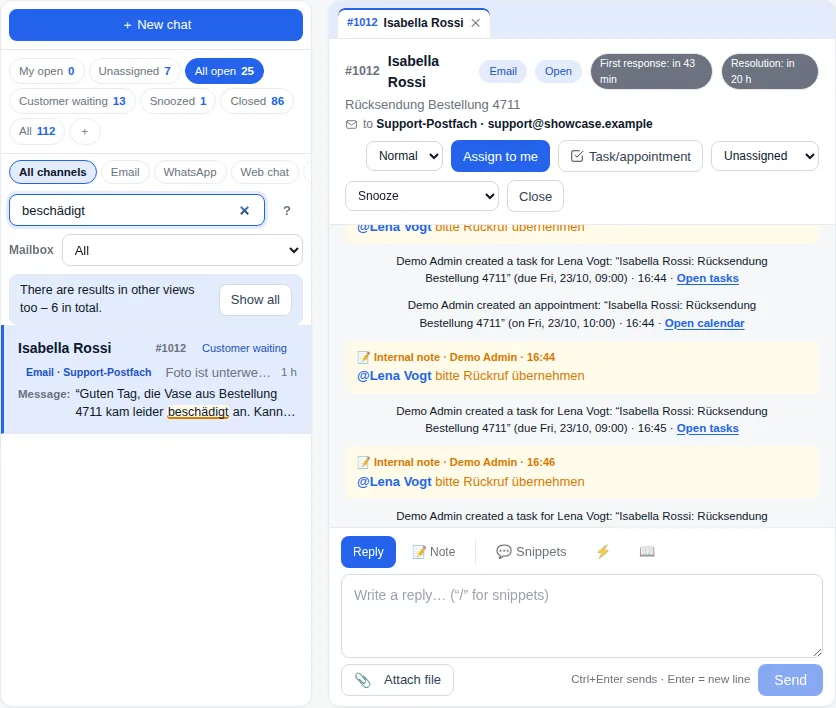
Yes, several people can use one WhatsApp Business number, up to a point. The free WhatsApp Business app runs on one phone plus up to four linked devices. Nobody can assign a chat or leave an internal note, though. For a bigger team, or for proper teamwork, you need a shared inbox on the WhatsApp Business Platform: a tool subscription plus Meta's per-message fees.
Below are all the options with their limits and costs, including the ones that don't involve us. The details on The-Y CRM come last.
WhatsApp Business with multiple users: your options at a glance
| Option | How many | Cost | Assign & notes | Phone calls |
|---|---|---|---|---|
| Free app with linked devices | Phone + 4 devices | Free | No | No |
| App with Meta Verified | 4 to 10 linked devices, depending on the plan | Paid subscription; price varies by country | No | No |
| Shared inbox on the WhatsApp Business Platform | Depends on the tool | Tool subscription + Meta per message | Yes | Depends on the tool |
Option 1: the free app with linked devices
On the phone, open “Linked devices”, add a device and scan the QR code shown by WhatsApp Web or the desktop app. According to WhatsApp, that works for up to four devices. With a paid Meta Verified subscription it depends on the plan: Business Standard 4, Business Plus 6, Business Premium 8, Business Max 10; price and availability depend on your country.
The good part: it's free and quick to set up. Away messages, quick replies and labels are included.
Where it stops:
- No “who's on it?”: you can't assign a chat, there are no internal notes, and you can't see who is replying.
- More than four linked devices only with Meta Verified from Business Plus; the top plan allows ten.
- The phone stays in charge. According to WhatsApp, linked devices are logged out if the main phone isn't used for 14 days.
- The app syncs the phone's address book. Use a work phone without private contacts.
- Calls and email stay somewhere else.
Using WhatsApp Business on multiple devices and two phones
A WhatsApp Business number runs on your phone and, according to WhatsApp, on up to four linked devices as well – five devices at once. A linked device can be a PC or laptop with WhatsApp Web or the desktop app, for example. All devices see the same chats.
Two phones work too: according to WhatsApp, a linked device can also be another phone. That way colleagues reply from their own phone with the same business number. The second phone counts as one of the four linked devices.
- On your phone, open WhatsApp Business and go to “Linked devices”.
- Add a device.
- On your computer, open WhatsApp Web or the desktop app and scan the QR code it shows with your phone.
Where the limit is: a fifth linked device isn't possible in the free app. With a paid Meta Verified subscription it's up to ten, depending on the plan; the entry plan, Business Standard, stays at four. If the phone isn't used for 14 days, WhatsApp logs the linked devices out. And even on several devices, nobody can see who is replying, and chats can't be assigned to anyone.
If you need more devices or clear ownership, a shared inbox is the next step (option 2). The app on the phone can keep running.
Option 2: a shared inbox on the WhatsApp Business Platform
For teams, Meta offers the WhatsApp Business Platform, often called the “WhatsApp API”. You use it through a provider's shared inbox on the computer: every chat has an owner, a status and internal notes, and as many colleagues as you like can work in it.
Keeping the app is often possible: some providers, The-Y CRM included, can connect a number that runs in the WhatsApp Business app to the shared inbox as well. The phone keeps working as before while the team works in the inbox.
What matters most for a small budget is the pricing model: per user, per workspace or flat. A few examples:
| Tool | Pricing model | Smallest plan (as published) | Phone system |
|---|---|---|---|
| Crisp | Per workspace, seats included | Essentials about $95/month, 10 seats | Not checked |
| Callbell | Per user | About €15 or $15 per user/month; free plan to try | Not checked |
| respond.io | Per plan, users included | Starter $79/month billed yearly ($99 monthly), 5 users | None of its own |
| Trengo | Per plan, users included | Boost €299/month net on a yearly contract, 10 users | Telephony as an add-on |
| Chatwoot | Per agent; self-hosted Community edition free | Community $0 self-hosted (no voice calls, no roles); otherwise from $19 per agent/month | Calls via Twilio or WhatsApp Calling, hosted from Business, self-hosted from Premium |
| The-Y CRM | Flat: all users included | Free for up to 3 users · Cloud Pro €20/month (about £17) incl. any VAT, Alpha & Beta | Built in: menus, queues, voicemail |
Crisp, Callbell, respond.io and Trengo as shown on their own pricing pages, checked 17 Oct 2026 (respond.io and Trengo also 10 Oct 2026); Chatwoot from its pricing pages, checked 10 Oct 2026. Prices change, so please check before you buy. Our detailed comparisons: respond.io · Trengo · Chatwoot · WATI · superchat. All product names are trademarks of their owners.
What Meta charges
With every tool, Meta charges per delivered message, by the recipient's country. Since 1 Oct 2026, the first 1,000 free-form replies per number and month are free; after that, each reply costs the service rate of the recipient's country. Templates, which you need for messages outside the 24-hour window, are charged from the first message, also inside the window. UK and Irish rates are in our cost calculator.
UK and Ireland: what to check
- Numbers: the WhatsApp Business Platform works with UK (+44) and Irish (+353) numbers. A landline number works too.
- Pounds: our prices are set in euros. At checkout, Stripe shows UK customers the price in pounds; €20 is about £17, depending on the rate.
- Data: The-Y CRM runs on our server in Vienna, Austria, inside the EU. A data processing agreement is available.
- Calls: for the built-in phone system you bring your own line from sipgate, Zadarma or Twilio. Check that your provider offers the number you need.
- Businesses only: Cloud Pro is sold to businesses (B2B).
How it works in The-Y CRM
The-Y CRM is a shared inbox with a built-in phone system, contacts, deals and invoices. We build it in Vienna; it's currently in Alpha.
- Sign up free on crm.the-y.at, no credit card.
- Connect WhatsApp with one click through Meta's sign-up window: either the number from the WhatsApp Business app (the app stays, with up to 180 days of history) or a new number. Guide
- Invite your team under Settings → Team: email, name, role. Everyone sets their own password. Guide
- Work together: assign chats, set a status, leave internal notes. More than 3 users? Book Cloud Pro in the app under Settings → License.
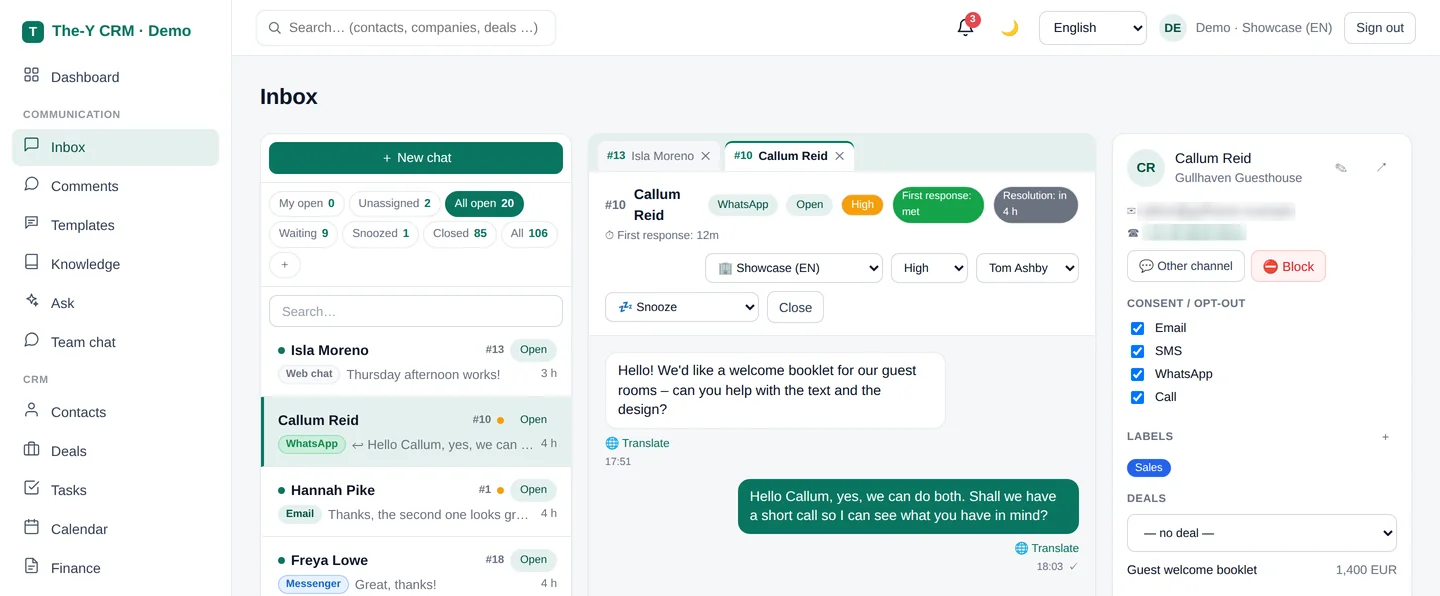
- Assignment, status, labels, priority and internal notes in one inbox for WhatsApp, email, phone, Facebook Messenger, Instagram and web chat, so omnichannel customer service in one place.
- Roles: Admin, Supervisor and Agent; each person sees only their own chats, their team's or all of them. Two-factor sign-in can be required for everyone.
- Missed calls: when nobody picks up, the caller presses 1 and gets a WhatsApp from your number. Missed call text back on WhatsApp
- Your accounts, your bill: Meta bills you directly, with no markup from us. Export your data any time (CSV and snapshot).
Full product page with a comparison of WATI, respond.io, superchat and Trengo: WhatsApp shared team inbox.
When something else fits better
Stay with the free app if …
- you're no more than three people and coordinate well,
- nobody needs to hand over chats or cover for a colleague.
Pick another tool if …
- you need proven, mature software today; The-Y CRM is Alpha,
- you need channels such as Telegram or TikTok,
- your callers need an English phone menu out of the box (see below).
- The-Y CRM is Alpha software. Automatic backups run, a formal failover comes in the Beta. Please back up important data yourself too.
- You record the phone system's announcements yourself (in the browser or as a file), so they can be in English. Record the short confirmation after pressing 1 too; without it callers hear the standard English “Thank you. Goodbye.”
- Push notifications in the phone app are still a beta. Open points: Known issues.
Sources: WhatsApp Business app, description in the App Store (linked devices, Meta Verified), checked 17 Oct 2026 · Devices per Meta Verified plan: WhatsApp Help Center “About Meta Verified for Business”, checked 7 Nov 2026 · Second phone as a linked device: WhatsApp blog, 25 Apr 2023, checked 3 Nov 2026 · Meta: Pricing on the WhatsApp Business Platform, valid from 1 Oct 2026 · Exchange rate for the £ figure: €1 ≈ £0.85 (mid-October 2026).