
Virtual phone system for small business: in the browser, with WhatsApp
You're a team of 2 to 10, and the phones should finally work properly: a greeting, everyone's phone rings, and if nobody picks up, the call still isn't lost. You no longer need a box in the office for that. A virtual phone system runs on the internet; you take calls in the browser, on your mobile or on a desk phone. This page covers what such a system can do, what you need and what it really costs per month – using The-Y CRM as the example, with sources and with its limits.
What a virtual phone system is
A phone system routes calls: it plays the greeting, rings the right people, transfers calls and records messages. It used to be a device in the office. A virtual phone system does the same on a server on the internet. Your phone number sits with a telephony provider, and the provider passes calls to the system over a so-called SIP line. SIP is simply the standard telephony providers use to pass calls over the internet; your provider gives you login details, and you enter them once.
In The-Y CRM the phone system is part of the shared inbox: a customer's calls, voicemails, WhatsApp messages and emails sit in the same history. When someone calls, their contact card opens right away.
What it does day to day
When someone calls
- Greeting and menu (“For appointments, press 1 …”) with your own recordings, recorded in the browser or uploaded as a file. Our free announcement generator writes the text for you
- Ring group: everyone's phone rings at once or one after another – even while the greeting plays, if you like
- Queue with hold music, position announcements and a callback at the press of a key
- Opening hours and holidays: outside them, a call goes to voicemail, for example
- Voicemail: messages arrive as audio in the inbox, in that caller's conversation
- Nobody picks up: the caller presses 1 and gets a WhatsApp message from your number (see how it works)
For your team
- Calls in the browser with a headset, in the app on your phone or on a desk phone
- Your mobile rings along when you're out – press 1 to accept
- Hold, transfer (directly or after a quick consultation) and call parking
- Click a number in the CRM to start a call
- Call log with “answered”, “missed” and “message left” and a “Call back” button; recording if you want it, with a notice to the caller
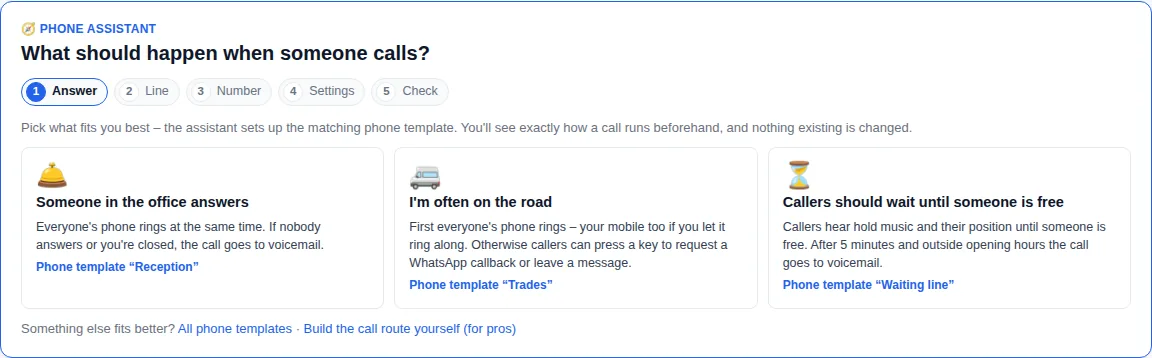
- Phone assistant and six ready-made phone templates: reception, trades, travel agency, medical practice, small office, queue
WhatsApp calls also arrive in the same phone system since version 1.1.45, with menu, group, queue and voicemail.
What you need
- A phone number with a SIP line from a telephony provider – currently sipgate, Zadarma or Twilio. You sign the contract yourself: the number stays yours, and the provider bills you directly for the number and minutes. You can take your current number to such a provider (porting); you request that from the new provider.
- A headset for your computer – a simple USB or Bluetooth headset will do. You don't need a desk phone, but you can connect one. Under Telephony → My phone you test your microphone and headset.
- A browser and internet at your desk. In our cloud, the technology behind it is taken care of. If you self-host, your server needs a public address and open ports for telephony (self-hosting guide).
- A The-Y account: free for up to 3 people, with Cloud Pro for the whole company (all users and brands).
Step by step: set up telephony →
What it costs – honestly calculated
You pay in two places: for the phone system, and at your telephony provider for the number and minutes. The-Y adds no markup to your provider's costs.
| Item | Price | Good to know |
|---|---|---|
| The-Y Free | €0, permanently | up to 3 users, 2 simultaneous calls, 200 outgoing call minutes a month |
| The-Y Cloud Pro | €20 a month incl. VAT or €240 a year | all users, up to 10 simultaneous calls, no minute limit; price during Alpha and Beta, €40 from the Live release |
| The-Y self-hosted | €0 with a free key · no limits for €10 a month or €240 one-time | free key with the same limits as Free; you pay for your server |
| Austrian number, example Zadarma | Vienna (01): €6 a month, €3 when paid annually · nationwide (0720): €4 or €2 | no activation fee; Zadarma asks for an ID document to order |
| Calls from Austria, Zadarma | landline €0.012 per minute, mobile €0.02 per minute | standard rate; economy rate €0.01 or €0.016 |
| SIP line in Germany, example sipgate trunking 2 | €9.95 a month plus VAT (€11.84 incl. VAT) | 2 incoming and 100 outgoing calls at once; German landline from 0.5 cents, mobile from 5 cents per minute, plus VAT |
| WhatsApp for “press 1” (optional) | per delivered template: Austria €0.0142, Germany €0.0456 | you pay Meta directly, no markup from The-Y |
| Headset | one-time, depends on the model | often already there |
Three worked examples
The examples only count outgoing minutes. Provider prices as shown on their pricing pages, checked on 29 Oct 2026 (Aircall on 26 Oct 2026); whether VAT applies is governed by your contract with the provider. Cloud Pro incl. VAT, Aircall plus VAT. For other countries, Twilio and Zadarma list prices per country. Calculator for every country: What The-Y CRM really costs.
Limits – honestly
- Alpha software: The-Y CRM is at an early stage. Automatic backups run; formal failover comes in the Beta. Some new phone features, such as the phone assistant and “my mobile rings along”, haven't been fully confirmed with real calls yet – see Known Issues.
- Simultaneous calls: Free 2, Cloud Pro 10. Your telephony provider's limit applies too – with sipgate trunking 2 that's 2 incoming calls. A mobile that rings along counts as one more call.
- No call waiting: if someone is already on a call, a second call goes to the fallback you set, for example voicemail or free colleagues in the group; otherwise the caller hears “busy”.
- No computer voice: you record announcements yourself. Without your own recording, callers hear a standard English sentence, a tone or a short silence, depending on where it is.
- The number comes from your provider, not from us. Currently you connect lines from sipgate, Zadarma or Twilio.
- Emergency calls only work over your own line. Store your location with the provider of that line.
- WhatsApp calls can't be forwarded to the phone network – Meta doesn't allow it.
Choose something else if …
- you only make phone calls and don't need a shared inbox – your telephony provider's cloud phone system is often enough,
- you want numbers from many countries from one provider, ready-made apps for desktop, Android and iOS and many ready-made integrations – Aircall, for example (comparison),
- you need mature, long-proven software today – The-Y CRM is Alpha.
Choose The-Y CRM if …
- calls, WhatsApp and email should land in the same inbox,
- missed calls shouldn't get lost – with “press 1 for WhatsApp”,
- you want a flat price instead of paying per head: free for up to 3 people, otherwise €20 a month for everyone,
- your number should stay with your own provider.
Missed calls: press 1 for WhatsApp
If nobody picks up, the caller hears something like: “Press 1 and we'll send you a WhatsApp message right away.” If they press 1, a message from your number arrives seconds later, and the conversation is in the inbox – with consent and timestamp. What it looks like in a real test call: Missed call text back on WhatsApp (with video). Set up in about 20 minutes: “Press 1 for WhatsApp” guide.
How to set it up
- Create a free account at crm.the-y.at.
- Add your line under Telephony → Lines with your provider's login details (server, user, password) – about 10 minutes.
- Answer the phone assistant: someone in the office answers, you're often on the road, or callers should wait until someone is free. You record the greeting right there.
- Make a test call from your mobile: the assistant tells you which number to dial.
All steps with screenshots: Set up telephony.
Frequently asked questions
How much does a phone system for a small business cost?
With The-Y CRM the phone system costs nothing for up to 3 people (Free) and €20 a month with Cloud Pro for more people, all users included (during Alpha and Beta). On top come the number and minutes from your telephony provider, for example Zadarma in Austria: a Vienna number €6 a month (€3 when paid annually), landline €0.012 and mobile €0.02 per minute. Our example with 6 people and 800 outgoing minutes comes to about €38 a month.
Can I keep my current phone number?
Yes, if you move it to a telephony provider that offers SIP access. You request this move (porting) from the new provider; whether and how fast it works is something you clarify with them. The number then sits with that provider, not with The-Y, and the provider bills you directly for the number and minutes.
Do I need desk phones?
No. A headset on your computer is enough; calls run in the browser. Desk phones with SIP and your own mobile can be connected as well.
How many calls can run at the same time?
2 with The-Y Free, 10 with Cloud Pro, and no plan limit when self-hosted with a licence. Your telephony provider's limit applies as well, for example 2 incoming calls with sipgate trunking 2. Above the limit, callers hear an announcement, the voicemail or a busy tone – you choose.
Does the phone system work on a mobile phone?
Yes. You can call from the app on your phone, or your mobile rings along when someone calls your extension; you press 1 to accept. The mobile that rings along counts as one more simultaneous call.
What happens to calls outside opening hours?
The phone system follows your opening hours and holidays. Outside them, a call goes to voicemail, for example, and the message arrives as audio in the inbox. If you like, the announcement offers “press 1 for WhatsApp” instead.
Try the phone system yourself.
Create a free account and connect your first line – or click through the inbox and phone system with sample data in the demo first. The demo is deleted after 24 hours.
Prefer to do it together? We set it up with you by video call – in your browser, nothing to install. Mon–Fri 10–12 and 14–17 (Vienna time).
More comparisons
Aircall · Zammad · Chatwoot · Chatwoot vs Zammad · osTicket · FreeScout · respond.io · Trengo · superchat · Bitrix24 · Freshdesk · WATI · WATI pricing · Userlike · Kommo · Zendesk · HubSpot · WhatsApp Business with multiple users · All comparisons
Sources (as of 10/2026)
- Features, simultaneous calls, lines and providers of the phone system in The-Y CRM: Set up telephony (version 1.1.53); plans and limits: costs page and pricing; open points: Known Issues
- Zadarma, Austrian numbers: zadarma.com/de/tariffs/numbers/austria; call rates: zadarma.com/de/tariffs/calls, checked 29 Oct 2026
- sipgate trunking, plans and parallel calls (all prices plus VAT): sipgatetrunking.de, checked 29 Oct 2026
- Meta's WhatsApp prices (utility template, Austria as “Rest of Western Europe”, Germany): price calculator at whatsappbusiness.com/products/platform-pricing, checked 29 Oct 2026
- Aircall Essentials, licence prices and minimum: aircall.io/de/preismodell (German view, euros), checked 26 Oct 2026 – details in our Aircall alternative
Aircall, sipgate, Zadarma, Twilio and WhatsApp are trademarks of their respective owners. Made to the best of our knowledge; please report errors to office@the-y.at and we'll correct them right away.