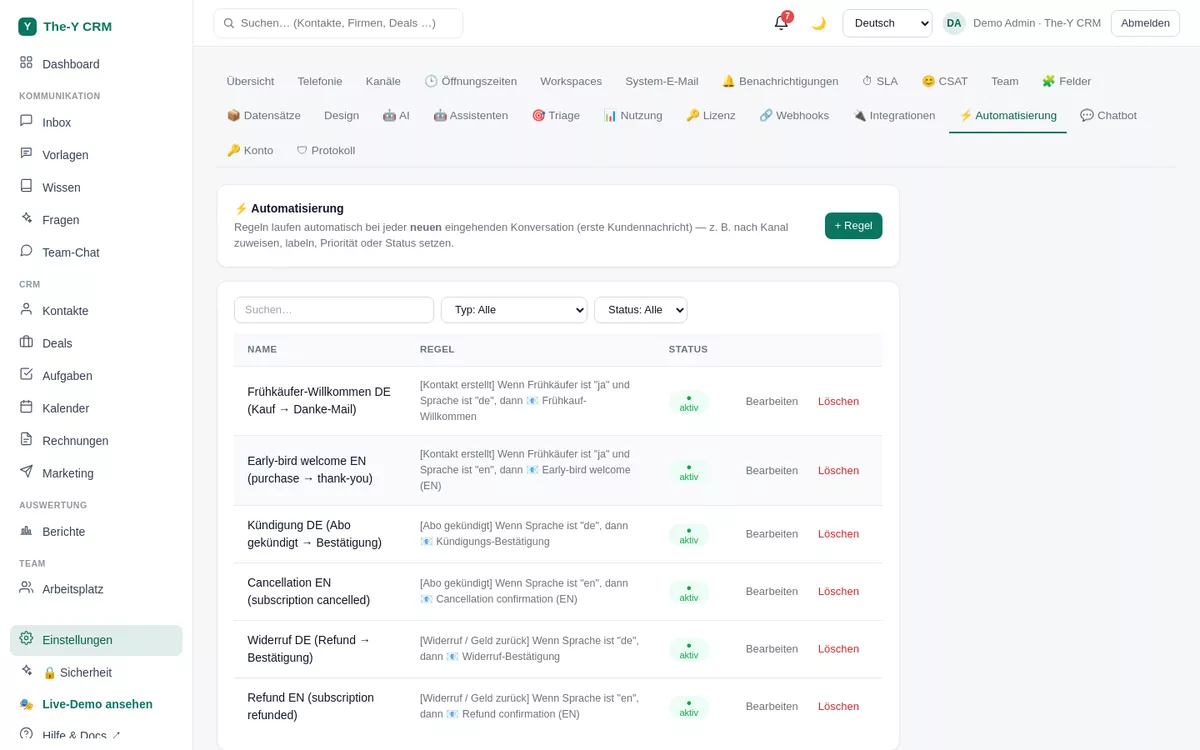
Automations take routine off your hands: IF something happens (new message, new contact, deal won …), THEN The-Y runs actions — assign, tag, notify, send a WhatsApp/SMS, have an AI agent take a note, and much more. Plus a rule-based chatbot for the WebChat.
⏱ approx. 5–10 min per rule · Permission: settings.manage (admin) · Free & Paid
Settings → Automation — IF→THEN rules.
Create a rule
Open Automation.Settings → Automation → "New rule".
Choose the trigger. When should the rule apply? (see the trigger table). For messages you can distinguish "New conversation" and "Every customer message".
Set conditions. Optionally narrow it down (see Conditions). Combine multiple conditions with AND and nest via "+ OR group" to (A and B) or (C and D).
Add actions. Pick one or more from the action palette (see Actions). Optionally as a time action (⏱) "X days later".
Save & activate. From now on the rule runs automatically on every matching event.
Triggers
Trigger
Fires when …
New conversation
a new ticket is created
Every customer message
an incoming customer message arrives
Contact created
a new contact is created (e.g. via email, import, webhook)
Contact updated
a contact field changes — incl. "changed" / "changed to <value>"
Deal won
a deal moves to the "won" stage
Subscription events
subscription cancelled / refunded (e.g. for follow-up mails)
Conditions
Fields: channel, subject, text, sender, priority, status, language and custom fields (custom.<key>).
Operators: is / is not / filled / empty / greater / less / before / after / changed / changed to.
AND/OR groups: conditions within a group are AND-linked; multiple groups are OR-linked — so you build e.g. "(urgent AND email) OR (subject contains cancellation)".
Via the language condition you do language-based routing, e.g. DE contacts → German welcome template, EN → English.
Actions (omnichannel · CRM · AI)
Group
Actions
Ticket/CRM
Assign · label · priority · status · internal note · set field · create deal · tag
Omnichannel
Send WhatsApp template · send SMS · notify team
AI & external
Run AI agent (result as a note) · call webhook
Actions are channel-aware and consent-respecting: a WhatsApp/SMS action is greyed out while the channel isn't connected, and it respects the contact's consent. The AI agent needs a configured AI key.
Time scheduler (delayed actions)
You can mark an action as a time action (⏱), e.g. "3 days after the trigger". A background job then runs it with a delay — ideal for follow-up messages or reminders.
Example recipes
Urgent emails straight to the support team. IF "Every customer message" · condition channel = email AND priority = urgent · THEN "notify team" + label "escalation".
Welcome WhatsApp on a new contact. IF "Contact created" · condition language = DE · THEN "send WhatsApp template" (German welcome template). (A second OR rule for EN.)
Follow up 3 days after a won deal. IF "Deal won" · THEN time action (⏱ 3 days) "send SMS" with a thank-you/feedback text.
Rule-based chatbot (WebChat)
Independent of the rules, a simple chatbot answers keyword queries in the WebChat. Under Settings → Chatbot you create "keyword → answer" pairs (e.g. "opening hours" → text). For AI-powered answers from the knowledge base, see the KB deflection bot.
Troubleshooting
My rule doesn't fire
Check (1) whether the trigger matches the event (e.g. "New conversation" vs. "Every customer message"), (2) whether the conditions really apply (AND is strict — a single unmet condition blocks the group), (3) whether the rule is active.
An action is greyed out
The associated channel isn't connected (e.g. WhatsApp/SMS) or the AI key is missing. Connect the channel or add the AI key — then the action becomes selectable.
The delayed action hasn't come (yet)
Time actions run via a periodic background job — a short delay around the scheduled time is normal. Consent is also checked for delayed send actions.