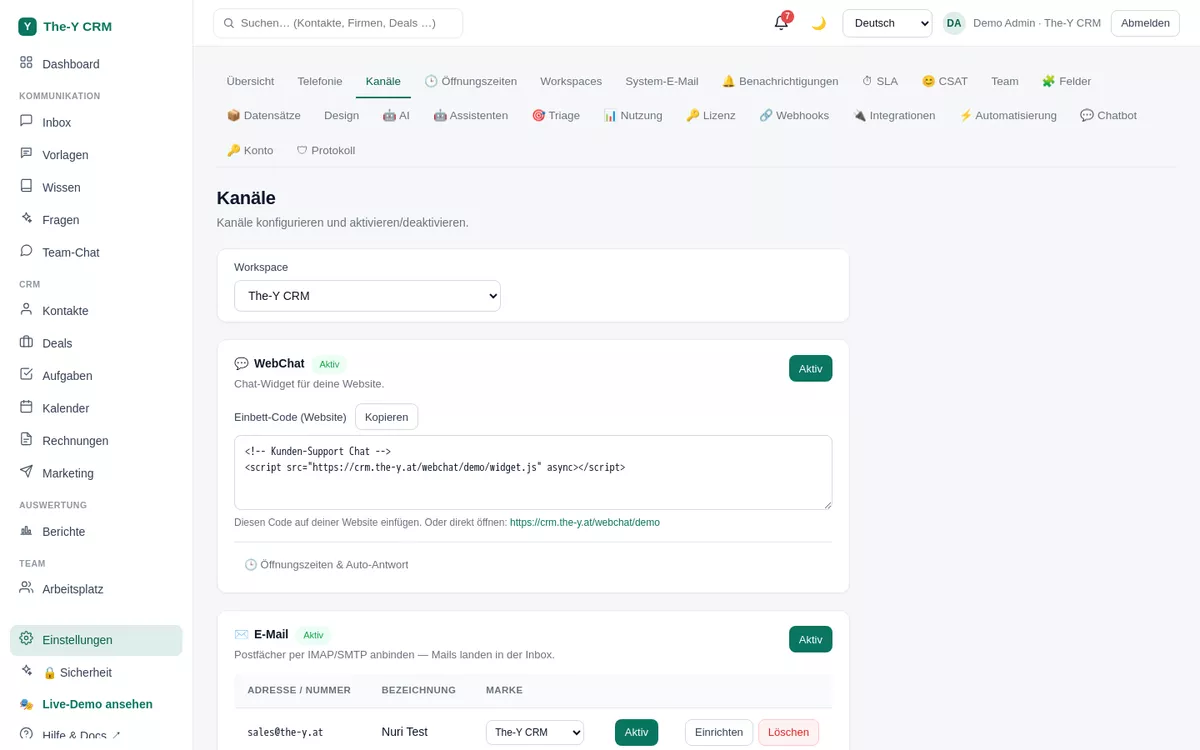
This guide connects the Meta family to The-Y CRM: WhatsApp Business, Facebook Messenger and Instagram direct messages (plus FB/IG comments). Afterwards, all Meta messages land in the same inbox as email & co.
⏱ WhatsApp approx. 10–15 min · Facebook/Instagram approx. 5 min · Permission: settings.manage (admin) · Free & Paid
Settings → Channels — where you connect WhatsApp/Messenger/Instagram.
Before you start — what you need
A Meta/Facebook Business account (business.facebook.com). If you don't have one yet, you create it right inside the connect dialog.
For WhatsApp: a WhatsApp Business Account (WABA) with a phone number that is not registered on a normal WhatsApp app (a landline number works too). You can create both in the Meta dialog.
For Messenger/Instagram: a Facebook Page; for Instagram a professional account linked to that Page.
For production use of Instagram DMs, FB/IG comments and posting, Meta requires a one-time app review on your Meta side. WhatsApp & Messenger work right after connecting; the extended Instagram permissions are unlocked by Meta only after the review. We guide you through the required details.
Part A · Connect WhatsApp
Open Settings → Channels and click "Set up" on the WhatsApp channel. There are two ways:
Option 1 (recommended): guided connect
Click "Connect". The Meta dialog (Embedded Signup) opens. Sign in with your Facebook Business account.
Choose or create a WABA & number. Pick an existing WhatsApp Business Account and number — or create both right in the dialog and verify the number by SMS/call.
Grant access. Confirm the permissions. The-Y then receives the credentials (token) and stores them encrypted. The number now appears as an active WhatsApp channel.
Option 2: manual (your own credentials)
If you prefer to manage your WABA yourself in the Meta developer console, enter the values directly:
In Settings → Channels → WhatsApp → "Set up" → "Set up manually".
Enter the following values from your Meta app / WhatsApp setup:
Phone number ID (the ID of the number, not the number itself)
"Send test". The-Y sends the standard template hello_world to a number of your choice (e.g. your own phone). If it arrives, sending is set up correctly.
On the hosted version (crm.the-y.at) the receiving webhook is already wired platform-side — nothing more to configure. When self-hosting, you enter the webhook URL + verify token in your Meta app (see the self-hosting guide).
Part B · Connect Facebook Messenger & Instagram
In Settings → Channels, on the Messenger or Instagram channel click "Connect Facebook & Instagram".
Select Page(s). After the Facebook login, the dialog shows your Pages (and the Instagram accounts linked to them). Pick the Page whose messages should land in The-Y.
Confirm. The-Y subscribes the Page and stores the Page token encrypted. Messenger and (after app review) Instagram DMs as well as FB/IG comments now appear in the inbox.
No Facebook login window? Then "Login with the JavaScript SDK" is not enabled in your Meta app, or the domain isn't allow-listed. On the hosted version this is done; when self-hosting see the Meta app settings.
WhatsApp templates (HSM) — for messages outside the 24-hour window
WhatsApp allows free text only within 24 hours of the last customer message. To write after that (or first), you need a Meta-approved template (HSM). Manage them under Templates (sidebar), section "WhatsApp templates".
Pick the account/number (if several), then "New template": language, category, text.
Optional: a header (text), a footer and buttons (quick-reply, link or call).
Placeholders {{1}}, {{2}} … for dynamic values. Meta requires example values for these — the form asks for them.
Submit → Meta reviews (status PENDING → APPROVED/REJECTED). Approved templates can be used in the inbox when the window is closed.
Two common Meta rejection reasons: (1) The text must not begin or end with a placeholder {{n}} (punctuation after it doesn't count as text). (2) If the text contains placeholders, example values are mandatory. The form warns you beforehand.
24-hour window & consent
While the window is open you write normal text in the inbox. When it's closed, a template composer replaces the free-text field (pick a template → fill placeholders → send).
In the customer panel you control consent per channel. A contact unsubscribed from WhatsApp is excluded from "New chat" and from marketing.
Troubleshooting
190 Invalid OAuth access token / "token invalid"
The stored WhatsApp token has expired or is wrong. Use a permanent system-user token (expiry "Never") from your Meta app and enter it again. With Option 1 (Connect), simply reconnect.
I'm not receiving any WhatsApp messages
Check: is the phone number ID correct (not the number itself)? Is the channel active? On the hosted version the webhook is set platform-side — but if your number is still subscribed to a different Meta app, nothing arrives. In that case unsubscribe the number in the old app and reconnect.
My Instagram account isn't shown in the connect dialog
The IG account must be a professional account (business/creator) and linked to the chosen Facebook Page. Check this in the Instagram settings, then connect again.
Instagram DMs/comments or posting don't work in production
Your Meta app needs the app review for the extended Instagram permissions (instagram_manage_messages, instagram_manage_comments, instagram_content_publish …). Without approval they only run in Meta developer mode. This is a one-time step on your Meta side.